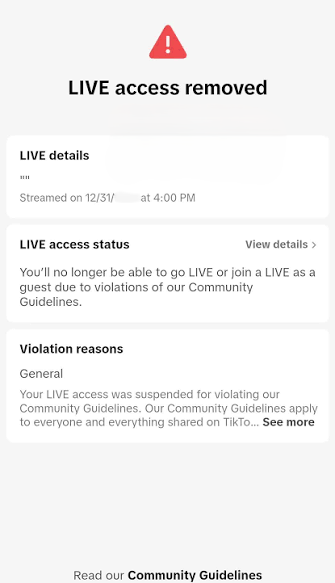
You’re mid-stream. The room’s warm, the comments are flying, and then, the screen freezes. A grey notification slides in: LIVE access suspended. No countdown. No warning. Just silence where your community used to be.
If that’s happened to you, take a breath. Here’s the first thing to know, and it’s the thing most panicked creators get wrong: in most cases, a LIVE ban is not an account ban. This guide walks you through exactly what happened, what it costs you, and the steps to get your access back.
What Happens When You're Banned on TikTok LIVE?
Losing LIVE access means you can’t stream, co-host, or send and receive gifts. It does not usually mean you’ve lost your account. In most cases you can still post videos, comment, and watch as normal.
A full account ban is a different, bigger event, it comes from violations across other areas of the app, or from severe or repeated LIVE violations, not from a single stream going sideways.
One nuance worth understanding: for LIVE, TikTok may temporarily restrict your access while your content is still under review. So a freeze isn’t always a final verdict. Sometimes it’s a hold, a pause to stop you continuing whilst they finish reviewing.
Types of TikTok LIVE Bans and Suspensions Explained
Not every LIVE ban is the same, and working out which one you’re looking at tells you how worried to be and what to do next. It comes down to two questions:
- How long it lasts
- How much of your account it touches.
You could encounter any of the following:
The temporary LIVE suspension: The most common one. Your LIVE access switches off for a set stretch, 10mins, 24 hours, a few days, a week, sometimes longer, with the length scaling depending on the violation. The upside: it lifts on its own. When the clock runs out your access returns automatically, though you can still appeal in the meantime if you believe it was a mistake.
The “under review” freeze: Sometimes access is pulled not as a punishment, but because TikTok is taking a closer look at something from your stream. This one isn’t a verdict, it’s a temporary hold put in place, while the review runs, . If the review clears you, your access comes back.
Feature-level restrictions: A penalty isn’t always all-or-nothing. You might keep streaming but lose gifting, have commissions frozen, or lose the ability to guest into other creators’ LIVEs, while everything else ticks along. These are easy to miss precisely because you can still go live; the restriction is sitting quietly on one feature rather than the whole thing.
The permanent LIVE ban: Here, LIVE access is gone for good. It usually follows a serious offence, or a run of temporary bans you’ve already stacked up on the same feature. The rest of your account may still work for posting, commenting, and watching, but streaming is off the table.
The account-wide ban: The biggest version, where losing LIVE is only part of the problem. Your whole account goes. This comes from severe violations, or repeated ones spread across the app, rather than a single stream slipping up. And one of the quickest ways to turn a LIVE-only problem into a whole-account one is trying to dodge a restriction, more on that mistake later.
What Happens to Your Account, Gifts and Earnings After a TikTok LIVE Ban?
For a creator who earns from gifting, this is the part that stings. When enforcement hits, your ability to stream and co-host switches off, and gifting and commissions can freeze even without a full ban.
Here’s the harder truth to sit with: TikTok’s Rewards Policy allows them to deny, suspend, or terminate access to rewards, including ones you’ve already earned, while they investigate a suspected breach, sometimes without notice, depending on how serious it is. And Diamonds can’t be transferred, traded, or bought from anyone but TikTok. Keep that last point in mind. We’ll come back to it.
How the TikTok LIVE Strike System Works
This is where a lot of online advice gets it wrong, so let’s be precise.
The first time your content is removed, you get a warning, a notification telling you which guideline you broke and how to appeal. It’s after that first warning that further violations become full strikes.
The exception? if your first violation is severe, you skip the warning entirely, take a strike, and may be banned on the spot.
TikTok counts strikes by policy area (like safety) or by feature and LIVE is its own bucket. Hit the strike threshold in any one of them and the account is permanently banned.
The reassuring part almost nobody mentions: strikes expire after 90 days. They stop counting toward a permanent ban once they age out.
Why creators get banned from TikTok LIVE
Some triggers are obvious. Others catch good people off guard.
The ones creators underestimate: pushing viewers off-platform, sharing contact details, naming other platforms, showing QR codes, reproduced content or external links. TikTok is strict about keeping people on TikTok.
Also risky: leaving your stream unattended or static with no presenter on screen, going live underage (you must be 16+), and playing copyrighted music.
And a big one, you’re responsible for everything that happens in your session, including what third-party tools surface. If a voice-to-text or comment display reads out something that breaks the rules, that’s still on you.
Then the obvious ones: hate, harassment, nudity, violence, and dangerous acts are all off-limits.
What Causes a Permanent TikTok LIVE Ban?
Some violations are a permanent ban on the first strike, no warning: CSAM or youth exploitation, promoting or threatening violence, non-consensual sexual content, human trafficking, and real-world torture.
Accounts can also be permanently banned for failing age or eligibility rules, deceptive impersonation, repeated intellectual property violations, hitting the strike threshold, trying to dodge a ban, or existing purely to break the rules.
What NOT to Do After Being Banned on TikTok LIVE
Three panic moves can turn a fixable situation into a bigger issue which could lead to you never recovering your account. Here’s what to avoid:
Don’t spin up a new account to dodge the ban: Ban evasion is its own violation, it can get the new account banned too, and it applies for as long as the restriction on your original account is live.
Don’t delete the flagged content hoping it clears the strike: It doesn’t. TikTok can still strike you after you’ve deleted it. The only thing that removes a strike is a successful appeal.
Don’t pay anyone promising to “restore” your access: This is the biggest scam in the space. No third party can lift a TikTok ban, and access and Diamonds can’t be bought back.
How to Check Why You Were Banned on TikTok LIVE
Before you appeal, find out exactly what you’re dealing with. In the app, go to Inbox → System notifications → Account updates. Your violation history lives in account check. Read the notification properly, it names the exact guideline you’re said to have broken, and the option to appeal.
How to Appeal a TikTok LIVE Ban
Open the violation notification, tap Appeal, write a short, calm, factual explanation, and submit.
Keep it tight. Reference the exact guideline cited, explain plainly why your content didn’t break it, and attach screenshots or timestamps if you have them. No emotional essays, no blaming the platform, that doesn’t help your case.
Appeal quickly, delay can make account issues worse. On timing, be realistic: some creators hear back within 24 to 72 hours, others wait several business days as many appeals are reviewed by a real person. If it works, your access is reinstated and the strike is removed. And even after a permanent ban, you can still log in to appeal and download your data.
How to Avoid Getting Banned on TikTok LIVE
The creators who rarely get banned treat LIVE like a managed broadcast, not a casual hangout. They moderate actively, bring in trusted mods, and steer clear of grey-area topics. They know the rules before they go live, something we teach Creators who join GravitasQ, stick to licensed music, and stay on-topic. Structure protects you and it lets you stay fully yourself without wandering into trouble.
Need Help Recovering Your TikTok LIVE Access?
Going LIVE is exciting, but it can also come with challenges. The good news? When you’re part of the GravitasQ Creator Network, you don’t have to figure everything out on your own.
If you’re already a GravitasQ creator and run into an unjustified LIVE ban, violation, or account issue, our team is here to help. We work directly with TikTok to escalate eligible cases, guide you through the process, and keep you updated every step of the way.
But our support goes far beyond account assistance. As a GravitasQ creator, you’ll also get free training through our Pathway Programme, dedicated one-to-one support from a Creator Manager, and access to a community of creators who genuinely want to see each other succeed.
Many LIVE issues are preventable with the right knowledge and support. That’s why we’re committed to helping our creators build strong streaming habits from day one, so they can grow with confidence.
Thinking about joining a Creator Network that supports you throughout your TikTok LIVE journey? We’d love to help you get started.